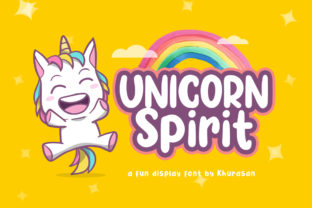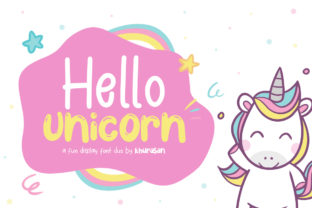
Hello Unicorn Font: A Bold, Playful Display Typeface for Creative Design
Looking for a font that instantly lifts your design from ordinary to extraordinary? Meet Hello Unicorn — a vibrant, expressive display typeface crafted for designers, educators, marketers, and creative professionals who believe typography should spark joy, not just convey text. More than just a pretty face, Hello Unicorn is a purpose-built tool for visual storytelling — one that balances whimsy with professionalism, personality with clarity.
What Is Hello Unicorn — And Why Does It Stand Out?
Hello Unicorn is a display font, meaning it’s intentionally designed for prominent, short-form use — headlines, logos, posters, social media graphics, packaging, and digital banners. Unlike body fonts (like Roboto or Georgia), which prioritize readability at small sizes and long paragraphs, display fonts like Hello Unicorn shine when they’re seen, felt, and remembered.
Its defining traits include:
- Bold, rounded letterforms with generous spacing and friendly curves;
- A hand-drawn aesthetic that feels warm and human — not rigid or robotic;
- Playful details like subtle bounce in ascenders, soft terminals, and joyful inconsistencies that echo real handwriting;
- Strong visual rhythm and high legibility — even at large sizes or on screens.
Unlike many “fun” fonts that sacrifice structure for quirkiness, Hello Unicorn maintains typographic integrity. That balance is what makes it versatile — equally at home on a kindergarten classroom poster and a boutique brand’s Instagram campaign.
The Purpose Behind the Playfulness
Typography isn’t neutral. Every font carries tone, intention, and cultural resonance. Hello Unicorn was created to fill a meaningful gap: the need for a professional-grade playful font that doesn’t default to cliché (think overused cartoon fonts or overly childish scripts). Its purpose is twofold:
- To humanize digital and print communication — especially in spaces where warmth, inclusivity, and approachability matter (e.g., education, wellness, children’s products, nonprofit campaigns);
- To empower non-designers — teachers, small business owners, content creators — with an easy-to-use, visually confident option that works “out of the box.”
In a world saturated with sleek minimalism and AI-generated sterility, Hello Unicorn offers intentional contrast: a reminder that creativity thrives when authenticity leads.
Where Hello Unicorn Fits in Real-World Design
You don’t need a graphic design degree to benefit from Hello Unicorn — but understanding where and how to apply it unlocks its full potential. Here’s how it’s used across contexts:
Educational Materials
Teachers use Hello Unicorn for bulletin boards, lesson headers, and classroom signage because it’s inviting without being distracting. Its open letterforms support early literacy development — letters like “a,” “e,” and “g” are clearly distinguishable, reducing cognitive load for emerging readers.
Small Business Branding
A local bakery might pair Hello Unicorn (for its logo or seasonal banner) with a clean sans-serif like Inter or Open Sans (for body copy). This combination communicates friendliness and craftsmanship — key emotional triggers for community-based commerce.
Digital Marketing & Social Media
On platforms like Instagram or Pinterest, where attention spans are measured in seconds, Hello Unicorn’s strong visual identity helps content stand out in crowded feeds. A quote graphic using Hello Unicorn + a soft pastel background often sees higher engagement than generic templates — not by accident, but by deliberate typographic psychology.
Creative Projects & Personal Expression
From DIY wedding invitations to podcast cover art, Hello Unicorn gives hobbyists a pro-level asset. Its extended character set (including ligatures, alternates, and multilingual support) ensures flexibility without complexity.
Common Misconceptions — Clarified
Before you download or license Hello Unicorn, it helps to clear up a few frequent assumptions:
- “It’s only for kids’ stuff.” — False. While it’s excellent for youth-oriented projects, its balanced weight and thoughtful spacing make it equally effective in modern branding for mental health apps, eco-conscious startups, and inclusive fashion labels.
- “Display fonts can’t be accessible.” — Not true. Hello Unicorn meets WCAG 2.1 AA contrast guidelines when paired with appropriate background colors and sized correctly. Its generous x-height and uncluttered shapes actually improve screen readability at headline sizes.
- “Using it everywhere will look unprofessional.” — Accurate — but that’s not a flaw, it’s a feature. Like wearing bold jewelry, Hello Unicorn is meant to accent, not overwhelm. Using it for body text would strain readability — just as using Helvetica Bold for a poem might mute its voice.
How Hello Unicorn Fits Into Modern Creative Workflows
Today’s designers juggle speed, scalability, and style — often across multiple tools and teams. Hello Unicorn supports this reality with broad technical compatibility:
- Available in OpenType (.otf) and Web Font (.woff2) formats;
- Fully compatible with Figma, Adobe Illustrator, Canva, Google Slides, and most modern design and publishing software;
- Includes stylistic sets, swashes, and language support for English, Spanish, French, German, Portuguese, and more — making it practical for global or bilingual projects.
For developers and content creators, Hello Unicorn integrates seamlessly into websites via CSS @font-face or third-party font hosts — enabling consistent, performant typography without sacrificing page speed.
Getting Started With Hello Unicorn — Practical Tips
Ready to try it? Here’s how to use Hello Unicorn effectively — whether you’re a beginner or a seasoned designer:
- Start with hierarchy: Use Hello Unicorn for primary headlines only. Pair it with a neutral, highly readable font (e.g., Lato, Nunito, or Source Sans Pro) for subheads and body text.
- Respect scale: It performs best at 36px and above on screen, and 24pt+ in print. Avoid using it smaller than 18px unless testing carefully for your audience.
- Embrace whitespace: Its friendly proportions thrive with breathing room. Add generous line height (1.4–1.6) and letter-spacing (+20–50 units in design apps) for maximum impact.
- Test color contrast: While Hello Unicorn looks lovely in pastels or gradients, always verify text/background contrast meets accessibility standards — especially for public-facing materials.
Why Typography Choice Matters More Than Ever
In an age of algorithm-driven feeds and fleeting attention, typography is one of the few design elements that operates on both conscious and subconscious levels. Hello Unicorn doesn’t just say “look at me” — it says “you’re welcome here,” “this matters,” and “creativity is serious fun.”
That’s why educators choose it to reduce learning anxiety, why startups select it to signal approachability before their first product demo, and why designers reach for it when clients say, “Make it feel joyful — but still trustworthy.”
Fonts like Hello Unicorn reflect a broader shift: away from one-size-fits-all corporate aesthetics and toward intentional, human-centered communication. They remind us that good design isn’t about following trends — it’s about choosing tools that align with your values, audience, and message.
Final Thought: Design With Intention, Not Just Aesthetics
Hello Unicorn is more than a font — it’s a mindset. It invites us to ask better questions: Who is this for? What feeling should it evoke? Where will it live — on a phone screen, a printed flyer, or a chalkboard wall? When you choose Hello Unicorn, you’re not just picking a typeface. You’re choosing clarity over clutter, warmth over cold efficiency, and creativity grounded in empathy.
So go ahead — download a trial, test it in your next project, and notice how a single font choice can change the entire tone of your work. Because in design — as in life — the smallest details often carry the biggest meaning.